
Our settings were a mess. Switching from light and dark mode was in one popup. Your profile was on a different page. Your avatar was on another page. And if you wanted to change how the racetrack looked, you had to be in a race to open that popup.
So we put it all in one place. Account, profile, avatar, notifications, appearance, racetrack, keyboard shortcuts, and developer stuff, all in one window. This is just the first version. We’ll keep adding to it and updating it over time.
Racetrack settings
You can now tweak how typing looks and feels without being in a race. There’s a live preview at the top where you can type and see your changes right away. Fonts, text size, display mode, reading options, motion, it’s all in there. Get it how you like it and it follows you into your races.

Keyboard shortcuts
These are brand new, and you can remap every one of them. Start a race, jump into practice, head to your private racetrack, leave a race, refresh text. Click a shortcut to change it, hit Escape to back out. They need Ctrl or Alt so they won’t mess with your typing. If you get carried away, there’s a button to reset everything.

For Developers
If you want to build something with your TypeRacer data, you can make an API key here now. It’s basic auth, and the docs are at developers.typeracer.com. Keep your keys private, and revoke any you don’t recognize.

Scorecard
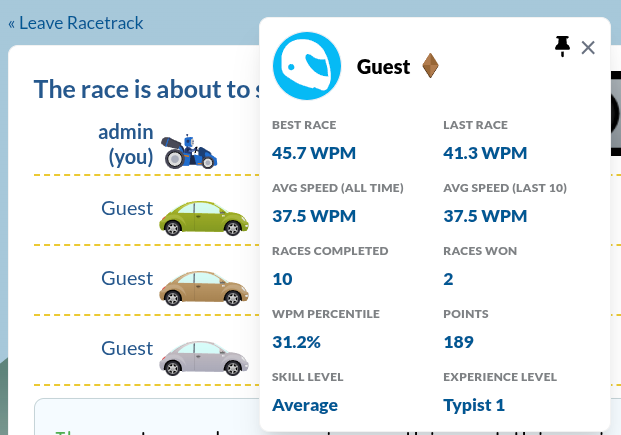
Oh yeah and the scorecards you get when you hover over someone got an update too. Best race, average speed, races won, percentile, points, skill level, and the rest are all there at a glance.
Hope you like this update, feel free to submit your feedback to our support desk here: https://teachmehelp.zendesk.com/hc/en-us/requests/new
See you on the track!

